
Health care integration projects drag on and on. Months of scoping, custom code, and back‑and‑forth testing slow your teams, delay revenue, and frustrate clinicians who still rekey data between systems.
You feel that drag every time a new digital health partner comes on board, a new device rolls out, or a payer asks for a different file format. Traditional integration models do not match the pace of Digital Health.
A no-code integration workflow gives you another path. You design, deploy, and adjust integrations in days, not months, while maintaining control of data quality, security, and compliance. You break out of dependency on scarce developer capacity and get closer to the true automation of healthcare workflows.
Why Traditional Deployment Fails
Traditional healthcare integration scaled up around point-to-point interfaces, custom code, and specialists. This model no longer scales with healthcare volume and variety.
You encounter the same problems over and over:
- Long requirement cycles, as IT, operations, and vendors operate from different assumptions.
- Custom code for each partner, every message type, and transformation.
- Bottlenecks in HL7 and API experts.
- Slow testing with defects exposed late, possibly in production.
- High costs associated with changes in standards, versions, or partner specifications.
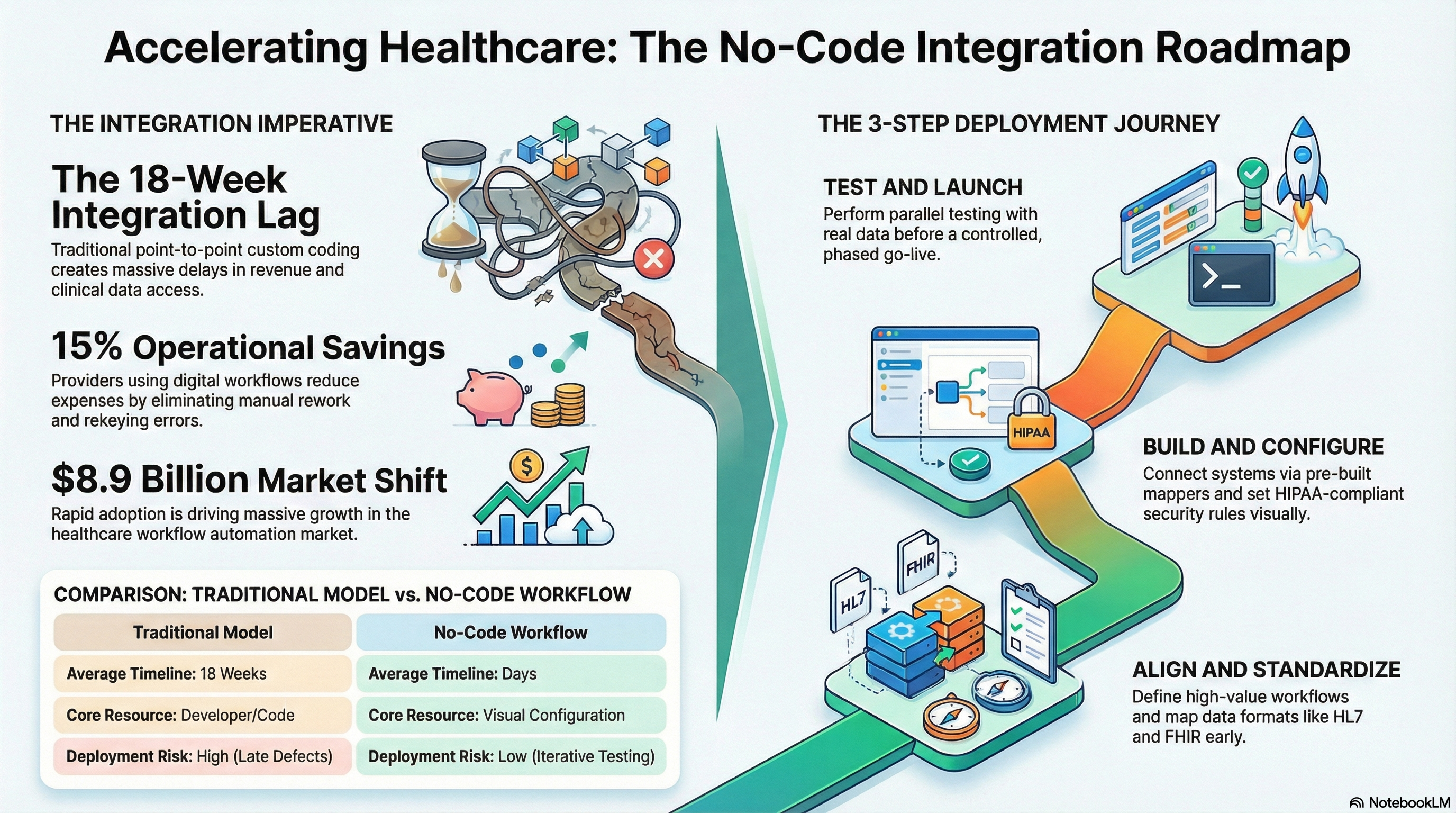
Such issues are reflected in performance metrics. According to a survey, the average time taken to achieve a new production-ready integration is 18 weeks. At the same time, over 60% of healthcare leaders believe that digital initiatives would have to yield benefits within two years or less, leaving little scope for six months to achieve a new integration.
When you perform integrations like this, you find yourself pushing your teams to manually complete tasks. This brings about copy and fax processes again. It diminishes the benefits you gain from healthcare automation solutions and hinders your processes related to fast healthcare integration initiatives.
No-Code Workflow Overview
The no-code integration workflow offers a visual method to define data flows between systems. Logic is defined using components, forms, and configuration, rather than writing code.
What this means for healthcare is that you can:
- Integrate EHRs, practice management systems, CRMs, patient engagement solutions, and devices.
- Standardize formats such as HL7, FHIR, X12, CSV, and proprietary APIs via configurations.
- Route, validate, or enhance using business rules without coding.
When well-implemented, an integration process that uses no code is still mindful of context and regulations. This must:
- All transaction records for auditing.
- Multiple support for role-based access.
- Manage PHI properly, following HIPAA guidelines.
- Add version control and environment promotion links.
Healthcare workflow automation is a reality. The healthcare workflow automation market size is expected to reach 8.9 billion dollars by 2030. This clearly depicts how quickly healthcare organizations have shifted from manual workflows to automated workflows. Even healthcare providers with digital workflow processes can reduce their operational expenses for increased efficiency and avoid unnecessary rework by up to 15 percent.
No-code platforms provide you with an engine to facilitate this transition. They minimize friction between ideas, enabling a smooth transition of teams from requirements to functional integration without a huge development process.
No-Code Integration Workflow: Core Building Blocks
Before you even think about how to deploy this solution over the span of days, it is imperative to understand the parts necessary for the assembly of a no-code integration solution. Most modern automation tools used in the healthcare industry, being part of this category, will provide you with the following:
- Connectors: Initial set of connectors for EHR systems, APIs, SFTP, databases, queues, and cloud apps.
- Data models. Templates for typical healthcare entities such as patients, encounters, claims, and orders.
- Transformation steps: Mappers for the graphical transformation of HL7 segments, FHIR resources, JSON, XML, and CSV fields.
- Rules and Routing: Point-and-click rules for sending messages to specific systems and queues.
- Validation: Inclusive validation regarding the format, required fields, and code sets.
- Monitoring/Alerts: Includes dashboard views for error, latency, and throughput-related messages.
All these features are brought together as workflows. A no-code integration workflow for a referral, for instance, could:
- Waiting for an HL7 ADT message from your EHR.
- Map it into a FHIR bundle for a specialty partner.
- Enhance with claims data from another system.
- Redirect route errors to the work queue for further checking.
All steps are viewable and editable by your integration analysts. This enables quick iterative development to accommodate changes in requirements so that healthcare integrations can occur rapidly with new partners and new lines of business.
Step-by-Step Deployment in Days, Not Months
For purposes of simplified explanation, I will go ahead and outline how you implement an integration workflow in no-code in a matter of days. I will do this starting from one use case. Then, I will scale up.
1. Define one high‑value workflow
Begin with one healthcare use case involving the automation of a workflow that meets at least these three criteria:
- High volume of manual process.
- Specific, predictable outcome such as rekeying minimized or greater speed.
- Few systems are to be considered, preferably two or three.
Common entry points:
- Patient intake automation from digital front door solutions to the EHR.
- Transmission of ADT events to population health solutions.
- Synchronizing orders between the EHR and a specialty vendor.
Record its present status in simple terms. Who launches the workflow, what information is provided, where it travels, and where any delay/ error occurs. This is a case where you do not require a 50-page specification. This is where you require a clear vision to translate into a no-code workflow.
2. Align on data and standards early
Align on data requirements next. This often saves weeks downstream.
For each system in scope, answer:
- The type of message formats, including HL7 v2, FHIR, X12, CSV, JSON.
- The events or endpoints you will use.
- Which fields are required for the business process.
- How you will manage identifiers across systems.
Standards still matter, and today, more than 90% of hospitals across the United States use certified EHR technology that supports standard formats. That gives you a base you can rely on when you design your no-code integration workflow.
Capture these decisions in a simple mapping sheet. This becomes your blueprint inside the no-code platform.
3. Configure your connectors
As the workflow process as well as the scope of the data have been determined, the task now moves to the platform.
In most no-code development platforms, you will:
- Choose source and target connectors, such as EHR, SFTP, API endpoint, or queue.
- Include connection details and credentials, as per your security policies.
- Set polling intervals or triggers for events.
- Basic error handling, like retrying, should be established.
Essentially, the aim is to achieve an intermediate stage where test messages can pass from the systems even prior to the full transformation logic implementation.
4. Build the no-code integration workflow
Now you have to translate your blueprint into a working workflow.
Typical steps:
- Define what should trigger the workflow – for example, a new message in a channel, or a scheduled job.
- Add transformation steps, use visual mapping to align source and target fields.
- Apply validation rules to enforce required fields and code sets.
- Routing can be set up per conditions such as facility, line of business, or message type.
- Set up enrichment steps, for example, lookups to master patient or payer systems.
You also set up the handling of PHI in healthcare. That is field‑level security when the data leaves your network, encryption in transit and at rest, and clear separation between test and production environments.
The visual nature of a no-code integration workflow lets clinical and operations stakeholders review logic without reading code. That reduces misalignment and gets you to acceptance faster.
5. Test with real data in a safe environment
Healthcare integration is not something that is rapid and high-risk. You still have to have disciplined testing, but you are doing it in parallel with configuration, as opposed to after months of development.
Focus on:
- Unit testing for each transformation and rule with sample messages.
- End-to-end testing of significant scenarios, like a complete intake process.
- Negative Testing: Examples include empty fields, incorrect codes, and disconnections.
Well-developed test methods in healthcare IT projects decrease the number of post-go-live events by approximately 30 percent. The no-code platform is particularly helpful in the following areas related to test case development: reusable test cases, difference visualization tools, and the replay function.
6. Train users and define support paths
You should train:
- Integration analysts and informatics team members.
- Operational owners for monitoring dashboards and basic troubleshooting.
- Provides oversight of approval flows, audit views, and documentation practices.
A concise and specific training program can be effective. Many health entities have reported improved adoption rates by keeping their training short and practical. More than 70 percent of health sector leaders have considered staff training as an effective element for successful digital projects, as identified in a survey.
The support paths for pre-go-live need to be defined. Who is responsible for monitoring the production environment? Who is reacting to notifications? The escalation process for issues reported by the vendors. The no-code integration workflow enables your team to handle it more straightforwardly. The ownership for this will need to be closer to the process in this case.
7. Go live in phases and monitor closely
Finally, roll out in carefully controlled phases.
- Beginning with a small facility or provider group or line of business.
- Parallelly processing using manual verification for a specified period of time.
- Throughout, error rates, and processing times should be monitored every day.
- Conduct short feedback sessions with the end users in the first two weeks.
Since the pace of configuration changes is much faster on no-code platforms, now address small problems in the application within hours, not during the time of the quarterly cycle. That is where you see the underlying value of deployments in days, not months, starting to appear.
Common Mistakes When Deploying No-Code in Healthcare
No-code is not a magic shortcut. You still need structure and discipline. These mistakes slow teams and create risk.
1. Treating no-code as a side project
If you treat your no-code integration workflow as a one‑off experiment, you lose the scale benefits. Integrations drift into different styles, rules, and standards.
Fix this by defining light design guidelines and naming conventions early. Use shared data models, reusable components, and common error‑handling patterns. That lets you reuse logic across workflows and shorten time to value.
2. Ignoring governance and change control
No-code changes are easier, but uncontrolled change in healthcare integration creates real risk.
You need:
- Role‑based permissions on who can edit, approve, and deploy workflows.
- Version control, with clear promotion paths from dev to test to production.
- Auditing logs on who changed what, when, and why
Connect these processes to your already existing ITIL or change control practices, so that your teams view no-code as an integral part of your core integration stack, not some separate tool.
3. Underestimating data quality
If the source data is incomplete or inconsistent, a no-code integration workflow moves that bad data faster, not fix it out of the box.
Address this by:
- Enforcing validation in the workflow.
- Data quality checks at the point of entry should be implemented.
- Route exceptions for resolution to clean queues.
Over time, use monitoring data to find root causes; work with clinical, registration, and billing teams for sustainable fixes.
4. Failing to measure outcomes
Many teams stop at go‑live. You need to assess impact.
For every no-code integration workflow, define the metrics beforehand of deployment:
- Manual steps removed.
- Rate of errors or rework volume.
- Cycle time from trigger to completion.
- Staff time shifted to higher‑value work.
Then, track them in your platform dashboards and operational reports. This data will give you a clear case for where to invest next, plus will help you build support across your organization for deeper workflow automation in healthcare.
Conclusion
A no-code integration workflow that is well-designed enables you to deliver the integrations in days while maintaining quality. You shift from the traditional long-term custom development projects to a model that entails collaboration in an overall visual setting from the analysts, clinicians, and operations teams.
The way is practical. Begin with one high-value process. Get alignment on the data and the standards. Set up the connectors. Develop and validate the solution in the no-code platform. Train your people. Launch incrementally. Steer clear of the pitfalls that come from a shortcut mentality when it comes to no-code.
When you have an increasing library of workflows, health automation tools move from the realm of ideas to affecting your daily tasks. You begin to reduce deployment cycles, decrease your workload, and provide accurate and timely data for clinicians when they require it.
Vorro concentrates on quick integration of the healthcare sector through a no-code integration workflow engine designed for the healthcare sector. Want to learn how your team can go from months to days without adding complexity? Talk to Vorro about your next integration projects.
FAQs
1. What does a no-code integration workflow in the healthcare industry entail?
A no-code integration workflow is a graphical representation for defining how data flows from and to healthcare systems through configuration and without coding. Sources are linked, fields mapped, and data logic rules are applied and tracked through a singular platform. This enables fast and secure integrations for healthcare IT, devices, payers, and health technology.
2. In what ways do no-code platforms satisfy HIPAA and security compliance?
The no-code platforms designed for the healthcare sector have provisions for encrypting both in transit as well as at rest transactions, role-based access, audit logs with a high degree of granularity, as well as the capability to separate environments. The no-code platforms allow you to determine who may view or edit these workflows. Healthcare security teams retain their authority when using the no-code platforms.
3. Where do healthcare automation tools relate to other integration engines?
Organizations are using no-code platforms alongside the existing engines. You could use the no-code integration solution for your new cloud applications, business partnerships, or workflow automation projects in the healthcare industry, while the legacy interfaces remain to be handled by your existing engine. You could start moving your highly valuable integrations to the no-code platform for speed.
4. At what speed can the average workflow go live when using a no-code approach?
Timelines also depend upon the complexity of the project. However, for simple workflows, the design-to-pilot phase just takes a few days of intense activity. This includes scope identification, data analysis, workflow setup, and selective testing. The largest time efficiencies come from reusability, connectors, and the flexibility of logic without the need for development.
5. Who Should Own a No-Code Integration Workflow Within a Healthcare Organization?
Typically, the responsibility for the ownership rests with an integration or the interoperability team, which is aware of the technology and the clinic workflows. They coordinate with the operation and the other clinical teams to identify the needs and determine the performance. In the right environment, the process analysis and the informatics teams also have the capacity to establish the workflows within the no-code environment.
